|
DVD Capabilities P1
Reading
Next we tried various flavours of
DVD recordable media, which included:
DVD-R, DVD-RW, DVD+RW, DVD+R, DVD-RAM
and a pressed DVD-ROM disk for our
read tests.
DVD-R
Firstly we checked its performance
with a DVD-R disk using Nero DVD
Speed:
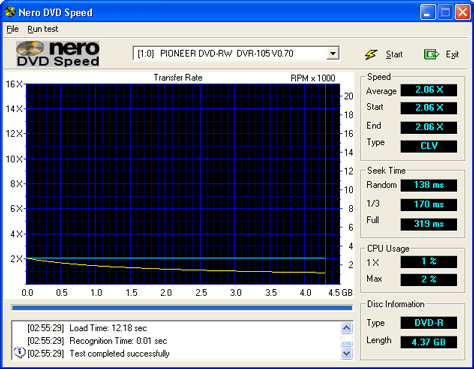
The A05 hasn't improved
the reading of DVD-R (1X & 2X
speed) disks and still manages only
2x CLV (although its greatest read
performance increase will be with
the new HS recordable DVDs, i.e. DVD-R
4X and DVD-RW 2X). The only difference
between the A04 is that the seek times
are lower (158ms vs 138ms).
DVD-RW
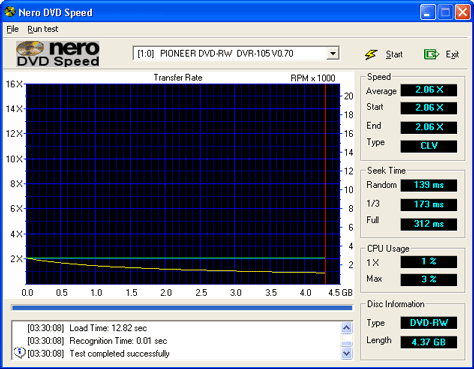
Like the A04, its read speed performance
for "-RW" disks was identical
to the "-R" disks however
seek times are better with the A05.
In this test it had an average speed
of 2.06.
DVD-ROM
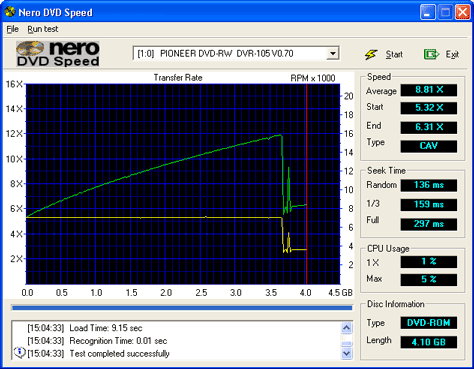
The A05's single layer reading ability
is very good at x12, above you can
see it does approach this but our
disk causes problems for it towards
the end causing its average to go
down to 8.81.
It uses CAV for reading DVD-ROMs
as opposed to CLV for DVD-R &
DVD-RW disks. Note that the new HS-DVD-Rs
will also be read using CAV.
DVD+RW
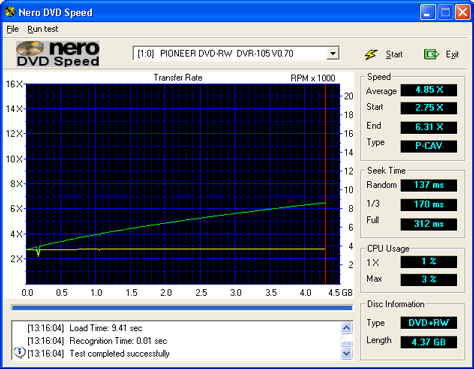
Another area in which the A05 is
better than the A04, it reads the
"+RW" disks at an average
of 4.85x speed (A04 was only 2x) and
with better seek times. Notice towards
the end of the disk it manages 6x.
DVD+R
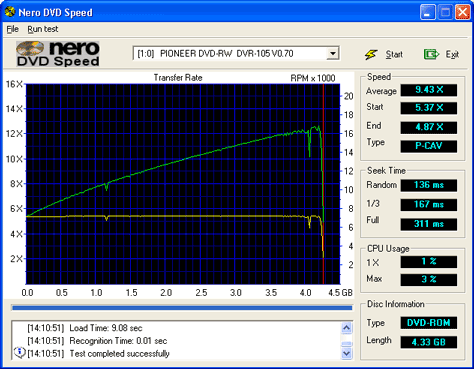
A test which the A04 excelled at
and the A05 improves on its performance
by doubling upon the A04s result.
As you can see it can read "+R"
disks at an average speed of 9.43X.
It also beats the Philips DVDRW228k
at its own game in this test.
DVD-RAM
For completeness we checked how it
behaved with a DVD-RAM disk out of
its caddy (the Toshiba SDM-1612 DVD-ROM
can read DVD-RAM disks like this).
The A05 could not recognise DVD-RAM
disks.
ERASING DVD-RW Disks
Full Erase
We timed how long it took to do a
full erase of a DVD-RW disk:

A full erase took 56 mins and 40
seconds(identical to the A04) - this
is much longer than the "+"
standard's 23 mins.
Quick Erase
Erasing DVD-RWs in quick mode only
takes 12 seconds.
DVD CSS RIPPING
Next we examined the speed at which
the drive could rip movies with the
content scrambling system (CSS).
There are legitimate uses for ripping
movies to the hard disk, for example
you might want to rent a DVD movie
and watch it at a later date. In this
case programs like CladDVD
XP or DVD
Decrypter will come in handy for
storing it to your hard disk.
I 16:30:52 Found 1x DVD-RW!
I 16:32:49 Operation Started!
I 16:32:49 Source Device: [1:0:0]
PIONEER DVD-RW DVR-105 0.70 (D:)
I 16:32:49 Destination Folder: \T2\
I 16:32:49 Fast Error Skip: No
I 16:32:49 Merge VOB Files: No
I 16:32:49 Stream Processing: No
I 16:32:49 Multi Angle Processing:
No
I 16:32:49 Detect Mastering Errors:
Yes
I 16:32:49 Remove Macrovision Protection:
Yes
I 16:32:49 Copying VTS_01_0.IFO...
(LBA: 40698)
I 17:26:48 Operation Successfully
Completed! - Duration: 00:53:58
I 17:26:48 Average Read Rate: 2,366
KB/s (1.8x) - Maximum Read Rate: 3,072
KB/s (2.3x)
Pioneer DVR-A03 Average Rip Speed:
2.1 x
Panasonic LF-D311 Average Rip Speed:
5.8 x
Philips DVDRW228k Average Rip Speed:
2.2 x
Pioneer DVR-A04 Average Rip Speed:
1.9 x
Pioneer DVR-A05 Average Rip Speed:
1.8 x
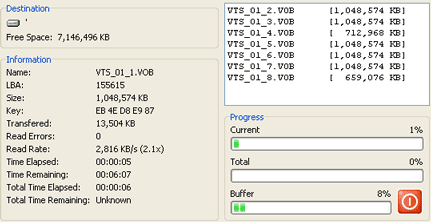
The A04 was bad at ripping DVD movies
and the A05 is no better, it manages
an average of 1.8x speed.
  Page
5 - Last Updated: 18 October 2002 Page
5 - Last Updated: 18 October 2002
|