|
DVD Capabilities P2
DVD-Video Dual Layer Reading
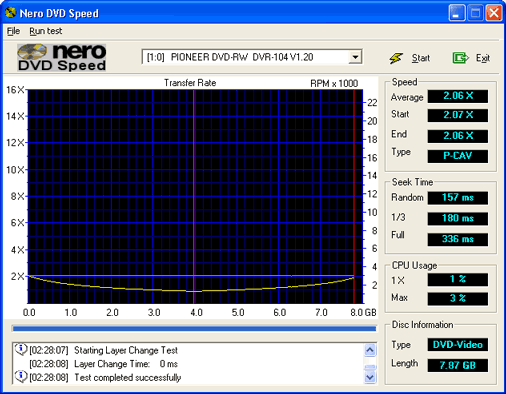
Above we tested the
drive's performance with a dual layered
movie (the movie title was "Terminator
2 : Ultimate Edition Disk 1").
As you can see it uses CLV at 2x speed
to read both layers - this is within
its specifications.
Playstation 2
We copied the game
"Tekken 4" using
a DVD-R disk and it booted successfully
on our PAL Playstation 2 (swap trick
aided by Action Replay). We also made
a backup onto DVD-RW but the Playstation
2 can not read re-writable disks without
drive modifications (we are told it
does play -RW disks but only on the
latest consoles).
X-BOX
Microsoft's X-Box games console is
also capable of reading DVD disks.
The console comes with a Thomson /
Philips DVD-ROM drive that can read
various media but has been designed
specifically to ignore certain media
types i.e. CD-R media.
The consoles games are stored on
single layered (dual layered is possible
but not used) DVD-ROM disks that have
been written from the outside-in -
a scheme once employed by the defunct
Dreamcast console (done to prevent
piracy).
Unlike the Playstation, you can not
make 1:1 copies using disk copying
software on the PC, you must transfer
the files from the console first (download
from the net, use an alleged hacked
firmware, transfer to the PC using
an Ethernet or dev kit).
The Pioneer A04 can produce X-Box
backup DVDs and both DVD-RW and -R
disk types produced were recognised
and booted by our homebrew modded
X-Box. We found that between the -R
and the +R disks we tested, the X-Box
favoured the -R format and would be
the disks every time 1st time. (This
is more to do with media as almost
all the +R disks currently are rebranded
Riteks).
DVD Writing Performance
To test the drive's writing performance
we used Nero 5.5.9.0 and
wrote 4469MB of data to the disk and
timed it.
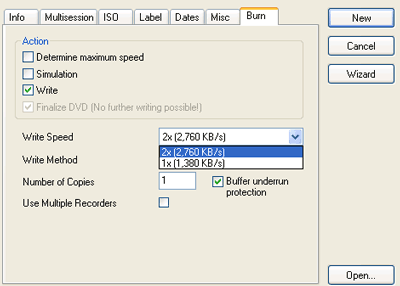
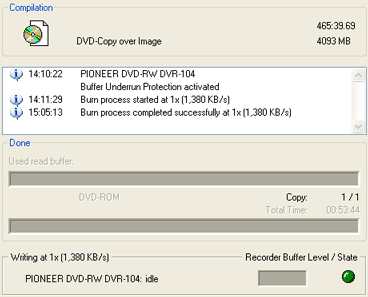
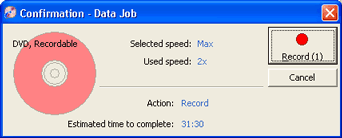
With DVD-R you can select a slower
speed just like CD-Rs and above Record
Now Max says the x2 disk will
take 31mins and 30 seconds, in reality
it only took 28mins and 42 seconds
to write a full 4469MB of data.
2 Speed Writing
Unlike the DVD+RW
format's write once "+R"
disks the "-R" disks can
be written at single speed which they
will take around 57 mins to fill a
full DVD-R or at double speed where
will take around 28 mins to write
a full DVD-R. Two speed writing is
a Pioneer specific invention and only
a few disks can be written to at this
speed. When Pioneer released the A03
there was an uproar as people felt
that they should have control over
what speed to burn at and risk the
consquences of making an unreliable
disk.
Pioneer didn't release
any information or label their packaging
appropriatley at the time to inform
customers that they could only write
at x2 with the most expensive media.
Now things are different and Pioneer
is informing their customers that
x2 recording is only possible on a
few disks:
"With the
launch of the DVD-103 DVD-R/RW drive,
Pioneer has included a feature allowing
2X recording of DVD-R. This feature
has been brought about by Pioneer’s
own engineering endeavor. Within each
drive is media specific optimizations
called ‘write strategies’.
These write strategies are tailor
made for specific media, making 2X
DVD-R recording possible.
Currently the DVD forum’s
specification for DVD-R is 1X DVD-R
recording. Pioneer was able to base
its 2X DVD-R recording feature on
the DVD forum’s specification,
making it possible to include this
benefit to its customers.
To make 2X DVD-R record compatible
‘For General’ media, the
following steps must be completed
before consideration. First, the media
must pass the DVD forum’s verification
for 1X DVD-R. Once cleared, with the
media maker’s cooperation, Pioneer
fine tunes the media for 2X recording,
then confirms the mass production
DVD-R media. Only after passing these
tests media is considered 2X DVD-R
compatible media.
Due to the use of this development
system, depending on the media’s
release date, 2X DVD-R recording may
not be possible. Unlike high speed
CD-R recording, 2X DVD-R recording
requires optimization. Without optimization,
the possibility exists that the recorded
media will lack the desired playback
quality. This system has been implemented
in order to avoid customer confusion
over DVD-R media that is deemed not
compatible with 2X recording.
Pioneer will make its best effort
to make it more understandable to
the end user by making this information
available in our instruction manual,
product packaging, and other methods
of communication. We will continue
to contact various media manufacturers
to increase the number of 2X record
compatible DVD-R media. Pioneer suggests
use of the following DVD-R media for
2X recording. This list shall be updated
as more 2X DVD-R media becomes available.
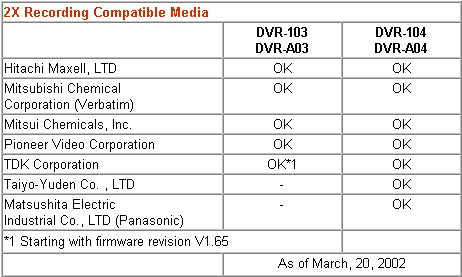
Of the media manufacturers listed
above, there does exist media that
is not 2X DVD-R compatible.
To confirm whether or not the
media intended for use is 2X DVD-R
compatible, please ask at the point
of purchase.
The 2X DVD-R record feature is
a media specific feature.
Depending on the media used, the record
speed may default to 1X."
Media Quality
We feel the quality
of some of the DVD-R media out is
very poor and often you will not notice
there is a problem until you manage
to write to the outer edges of the
DVD (near the maximum capacity of
the disk i.e. 4,400MB). Disk writing
would often be successful but whilst
reading the data back using a verification
process you will find that data written
on the outer edges will fail and become
unreadable.
This problem only
existed with the cheapest spindle
DVD-R media and some of the more expensive
media worked perfectly every time.
Compatibility Test
Compatibility is one area that has
been much debated between the recordable
formats ("minus" and "plus")
below we have added the "Pioneer
DVR-A04". Please note: this table
is not done from user contributions.
PC
DVD-ROM RECORDABLE FORMATS COMPARISON |
Drive
Tested |
-R |
+R |
-RW |
+RW |
Toshiba
SDM-1612 |
YES |
YES |
YES |
YES‡ |
Pioneer
116 |
YES |
YES |
YES |
NO |
PSX2 |
YES |
YES |
NO |
NO |
X-BOX |
YES |
YES |
YES |
YES |
Philips
DVDRW228k |
YES |
YES |
YES |
YES |
Pioneer
DVR-A04 / 104 (NEW) |
YES |
YES |
YES |
YES |
‡Only with the latest firmware
upgrade (version 1806 or later).
  Page
6 - Last Updated: 10 August 2002 Page
6 - Last Updated: 10 August 2002
|