|
DVD Capabilities
This drive is rated at x1 speed DVD
write but unfortunately it can't write
to DVD-RW disks. The drive has a big
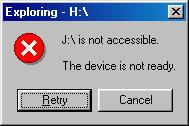
problem with disks from www.fwsltd.com
(same disks as playstation mods) and
wouldn't even read disks that had
been written with the Pioneer A03!
We tested writing on Pioneer, Infiniti
& TDK disks and encountered no
problems with these media.
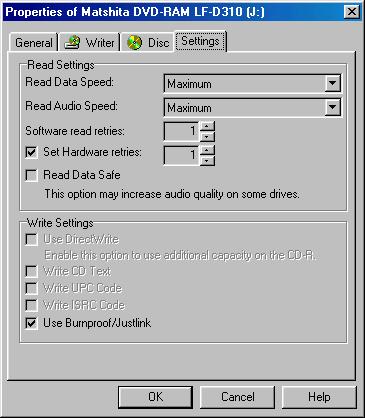
BURNPROOF
Although we weren't expecting it,
we were quite surprised to find that
the drive supported anti-coaster technology.
Burnproof is essential when burning
4.4GB of data because it not only
saves you money but time as well.
Burning a full DVD will take a lot
of time at x 1 approx. 1 hour for
simulation and 1 hour for actual writing.
Again the only application that it
worked with was VOB Instant CD/DVD.
We tested it by pressing CTRL-ALT-DEL
during a burn. This brought up the
task manager and emptied the data
buffer -- the front LED changing to
green and after a 1 minute wait, we
pressed cancel and the orange light
went back on to signify writing was
taking place again.
Note: Burnproof is only useful
when you have a slow source, whether
it is caused by a scratched disk or
a busy disk sub system, other problems
like an unstable system, or bad media
and burnproof will not help you.
DVD-RAM
What is DVD-RAM? The following is
taken from Toshiba's FAQ (a company
really pushing the DVD-RAM format):
DVD-RAM drives use phase-change technology
in which a laser heats the inner surface
of the disk to magnetically charge
it. This allows the data to be rewritten
hundreds of thousands of times. A
"wobble-land-groove" format
provides clocking data, with marks
written on both the grooves and the
lands between grooves. The grooves
and pre-embossed sector headers are
molded into the disc during manufacturing.
The DVD-RAM wobble-land-groove format
or track structure makes DVD-RAM technology
reliable, and the constant linear
velocity format provides high access
speed and capacity.
DVD-RAM discs consist of double layers
of metallic film embedded in hard
plastic. The drive motor constantly
changes the disc's rotational speed
to compensate for the location of
data on the disc. A laser uses light
of varying intensities to write and
erase data. The metallic layers in
the disc are made of a crystalline
material that reflects light the way
a mirror does. To write data, the
laser heats a metallic layer to 900
to 1,300 degrees Fahrenheit and creates
pits in the surface. To erase or change
data, a weaker laser beam heats the
pits to approximately 400 degrees
Fahrenheit.
There are two types of DVD-RAM cartridges:
type 1 is sealed and type 2 is also
sealed but allows the disc to be removed.
The disks that come with the LF-D311
are type 2 and on the packaging it
warns you that removing the disks
out of the caddy limits the performance
of them.
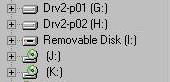
When the driver software is installed
for DVD-RAM operation, another drive
appears in explorer as a removable
disk (in Windows 98). Here I: is used
to access FAT32 formatted DVD-RAM
disks.
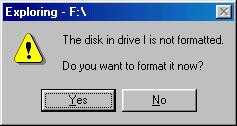
When you first insert an unformatted
DVD-RAM disk you will be prompted
to format it by windows:
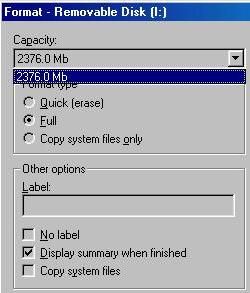
It takes around 1 second for a full
format of a 2.6GB disk by the windows
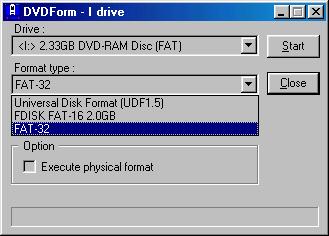
format tool and using DVDForm (which
comes with the drive) to write a FAT32
filesystem will take around 30 seconds.
Operation is as easy as dragging
and dropping your files to the removable
disk.. but we did find the operation
to be a little slow. For example it
took over 2 hours to fill a 2.6GB
disk.
Conclusion
On paper the specifications of this
drive didn't look too good compared
to the Pioneer A03:
- 1 speed DVD-R writing
- No rewritable DVD-RW support
- No CD writing support
In practice we found it quite a good
drive because of its very quite operation
and its DVD-RAM support combined with
good CD/DVD reading ability. Even
though writing DVD-R disks is limited
at x 1 with this drive, you will often
find that your time in producing DVD
disks will not just involve the 57mins
for actual writing, but if you were
to play it safe and do a simulation,
write and verify it will take 3 hours
(around the same time as the Pioneer
A03).
The fact that it doesn't support
CD writing is not that great a loss
because CD writers are so cheap now,
but not having support for DVD-RW
is a big disadvantage. Writing to
DVD-RW are useful because they can
will help you with formatting problems,
testing and compatibility checking
with standalone players. The price
for the drive when it was released
was lower than then Pioneer A03 (and
will be £399+VAT in december)
.. so this kind of justifies its lack
of features.
Another advantage of this drive is
that it can produce working backups
of Playstation 2 DVD disks (if you
have a suitable modchip installed).
If your looking to backup PSX2 disks
then you should give this drive some
consideration -- although we think
that the Pioneer is better suited
for this task (for reasons of speed).
DVD-RAM disks are great for backing
up data as they operate just like
mini 4.3GB hard disks right down to
allowing a FAT32 file system to be
written on them. The operation of
the DVD-RAM disks is very easy...
its just drag and drop like packet
writing software on CD-Rs.
Anyone that wants a drive that can
make reliable data backups should
seriously consider this drive as it
offers something different than your
conventional recordable optical drive.
  Page
6 - Last Updated: 11 November 2001 Page
6 - Last Updated: 11 November 2001
|